lazy-html
Turn your data into a pretty, clickable web page. No coding needed.
Free · after downloading, follow the steps below to add it to Claude
auto_awesomeWhat is it?
lazy-html is a small add-on for Claude (Claude calls it a “skill”). Once it’s set up, just hand Claude whatever you want to organize — a piece of text, a list, a file, or even just a topic — and it builds you a pretty, clickable web page.
The result is a single file: save it and open it in any browser, send it to a friend, or put it online to share. You never write a single line of code.
- edit_off No coding Just chat to get it done
- description One file Opens anywhere, easy to share
- palette Pretty & handy Bilingual & dark mode built in
conversion_pathHow it works
Once it’s set up, using it takes just three steps — all by chatting:
1
upload_file
Hand it your stuff
A piece of text, a list, a file, or just a topic
2
forum
Answer a few questions
Pick the layout and style you want
3
web
Get a pretty web page
A single file — opens anywhere, easy to share
rocket_launchHow to use it
Set it up once, then use it in any chat with Claude. Just four steps:
- Download lazy-html (the “Download” button above).
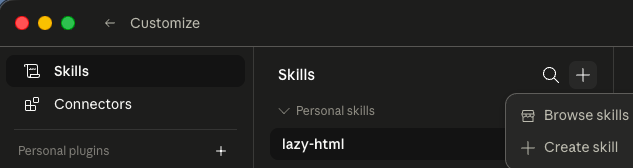
- Open Claude, go to Customize → Skills, click the + at the top right, and choose Create skill.
- Import the lazy-html file you just downloaded.
- Done! From now on, just tell Claude “use lazy-html to organize this” and answer a few quick questions (layout, style) — it does the rest.